Posts

View All Site Collection Users in SharePoint 2010 and 2013

I have had to do this a few times so I thought I would put this out here so I can find it easily again.  In SharePoint 2007 there was this nice view of all the users in a site collection, this provided a great way to remove users from all parts of the site collection in one shot.  There are many reasons why one might want to do this, if a user is no longer with the company or if there name is not syncing up correctly with a change made in AD.  The ‘secret URL’ in SharePoint 2010 and 2013 to do this is: http(s)://<your site>/_layouts/15/people.aspx?MembershipGroupId=0 Probably the easiest way to get to this URL is to go into any group on your root site collection and just change the query string to have the Membership Group ID to 0.

Corporate Intranet Information Architecture – a Publishing Site

Image
There have been several occasions in my consulting career where I have discussed what a corporate intranet should look like.   There are several aspects to this question, branding, custom web parts or other bells and whistles, but I believe that the fundamental structure or information architecture is one of if not the most important aspect of a solid, useful corporate intranet. Clearly, each individual company will have a unique look and feel and information architecture.   This will depend on the underlying business as well as the relative size, geographical locations and languages of the company. However, I have noticed certain commonalities across companies and have started to develop a template of how I can help an organization visualize there corporate intranet.   This could be used as a target to reorganize an existing intranet or as a template to stand up a new one.   In either case, changes will have to be made to suit the individual company’s nee...

No Search Results in SharePoint Contextual Search OSSSearchResults.aspx

This is another one for me so I never have to figure this out again.   All the other posts I found when looking into this talked about how to set up a search center and redirect people over there.   That is pretty well documented at this point, but the problem I had was that people were trying to search the local site, being direct to the out of the box _layouts/OSSSearchResults.aspx page and getting no results.   The fix was frustratingly simple, check your alternate access mappings.   If you have extended the web app and users are using the new AAM then that could be the reason that the OOTB search results are not working.   In my case I had the short name as the default, and the FQDN as the custom, I switched them and now everything works.

Get Web Part By GUID

Can't take credit, found this one.  I just want to make sure I can find this again. :) SELECT WebParts . tp_SiteId , WebParts . tp_ID , WebParts . tp_ListId , WebParts . tp_Type , WebParts . tp_Flags , WebParts . tp_BaseViewID , WebParts . tp_DisplayName , WebParts . tp_Version , WebParts . tp_PageUrlID , WebParts . tp_PartOrder , WebParts . tp_ZoneID , WebParts . tp_IsIncluded , WebParts . tp_FrameState , WebParts . tp_View , WebParts . tp_WebPartTypeId , WebParts . tp_AllUsersProperties , WebParts . tp_PerUserProperties , WebParts . tp_Cache , WebParts . tp_UserID , WebParts . tp_Source , WebParts . tp_CreationTime , WebParts . tp_Size , WebParts . tp_Level , WebParts . tp_Deleted , WebParts . tp_HasFGP , WebParts . tp_ContentTypeId , AllDocs . DirName , AllDocs . LeafName FROM WebParts INNER JOIN AllDocs ON WebParts . tp_PageUrlID = AllDocs . Id WHERE ( WebParts . tp_WebPartTypeId = '<Web Part GUID>'

SharePoint Options for Globally Distributed Environments

Image
Introduction Since I started working with SharePoint environments in global companies there has been a common complaint for remote users.  Performance.  Users in remote locations can feel disenfranchised by slow page load times and overall latency of the platform.  In reality, who wants to consume information from a corporate intranet that takes 15 seconds or more to paint a page?  There are several solutions to this issue, with different advantages and drawbacks, and depending on an individual companies unique needs different approaches should be considered. Why is SharePoint Slow?   This is the question that I first asked myself when determining the best way to speed it up.  The framework, one of the greatest strengths of SharePoint is also its icicles heal.  SharePoint provides a robust framework that allows end users to modify pages and content though lists and web parts.  End users can create site collections and sites to rapidly...

cannot add the specified assembly to the global assembly cache

I had this error when I tried deploy a WSP into a SharePoint farm, one of the DLLs needed to go into the GAC (global assembly cache.)   I checked the GAC and the file already existed, I tried to uninstall the file and got the error that the file was in use and could be deleted.   After doing some checking around I found the following link that resolved my issue: __http://support.microsoft.com/kb/873195__ Basically you go into the registry and find go to the following locations: ·         HKEY_CURRENT_USER\Software\Microsoft\Installer\Assemblies\Global ·         HKEY_LOCAL_MACHINE\Software\Classes\Installer\Assemblies\Global Find the entry for your problem assembly and remove it.   Then try and uninstall the assembly out of the GAC and redeploy your WSP.

Old school kick user with cmd

This is more for my memory; there are far better blog posts on this out there. qwinsta /server <server IP or name> result: SESSIONNAME       USERNAME                 ID  STATE   TYPE        DEVICE rwinsta /server <server IP or name> <ID form the result above>

Cloud Options – different flavors of the Cloud, IaaS, PaaS, SaaS.

Image
In the past year I have been asked several times about the ‘Cloud’.   Many customers think the cloud is a magical place where users train themselves, systems never go down, internal IT is no longer needed and an overall feeling of rainbows and kittens. Before moving to the cloud there are several factors to consider.   The cloud is not always right for every customer every time. One of the primary things that companies should think about is what ‘type’ of cloud solution is best for their business.   Each flavor of cloud comes with benefits and drawbacks that need to be matched up the business’s needs prior to taking the cloud plunge.   Even within each option there are several different levels of service offered.    This is a brief and highly over simplified description of the ‘favors of the cloud’ IaaS – Infrastructure as a Service This option usually means the business will have complete access to the servers.   It is commonly revered to as ...

SQL query – Get the number of non-null entries in all table columns without typing in each column names

DECLARE @col varchar ( 255 ), @cmd varchar ( max ),   @numval varchar ( max ),   @Parm varchar ( 500 ), @SQLString nvarchar ( 500 ), @ParmDefinition nvarchar ( 500 ), @CountSQLQuery varchar ( 30 ); DECLARE getinfo cursor for SELECT c . name FROM sys . tables t JOIN sys . columns c ON t . Object_ID = c . Object_ID WHERE t . Name = 'YOUR_TABLE_NAME'   OPEN getinfo   FETCH NEXT FROM getinfo into @col   WHILE @@FETCH_STATUS = 0 BEGIN       SET @SQLString = N'SELECT @result = COUNT(*) FROM YOUR_TABLE_NAME where ' + @col   + ' is not null' ;       SET @ParmDefinition = N'@result varchar(30) OUTPUT' ;       EXECUTE sp_executesql @SQLString , @ParmDefinition , @result = @CountSQLQuery OUTPUT ;       print @col + '     ' + @CountSQLQuery FETCH NEXT FROM getinfo into @col END   CLOSE getinfo DEALLOCATE...

SharePoint Central Admin cannot be access from web front end - Disable Loopback

From MS: http://support.microsoft.com/kb/2451858 Method 1: Specify host names (the preferred method for NTLM authentication) To specify the host names that are mapped to the loopback address and can connect to websites on your computer, follow these steps: Set the DisableStrictNameChecking registry entry to 1. For more information about how to do this, click the following article number to view the article in the Microsoft Knowledge Base: 281308   (http://support.microsoft.com/kb/281308/ ) Connecting to SMB share on a Windows 2000-based computer or a Windows Server 2003-based computer may not work with an alias name Click Start , click Run , type regedit , and then click OK . In Registry Editor, locate and then click the following registry key: HKEY_LOCAL_MACHINE\SYSTEM\CurrentControlSet\Control\Lsa\MSV1_0 Right-click MSV1_0 , point to New , and then click Multi-String Value . Type BackConnectionHostNames , and then press ENTER. Right-click BackConnectionHostNames , and t...

SharePoint SP or hotfix failed...

psconfig -cmd upgrade -inplace b2b -force

Deploy and retract a WSP in SharePoint 2007 using Central Admin

Image
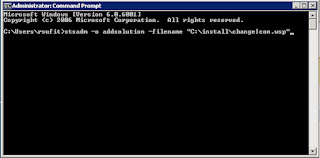
I once had an engineering professor that said ‘It is easy once you know how to do it.’   Obviously, but first you have to know how to do it. This is pretty basic but if you are learning SharePoint administration but I figured I would throw it up here in case someone needed to learn it.   Deploying and retracting a WSP in SharePoint 2007 is makes managing customized SharePoint sites much easier to maintain and manage.   Instead of dropping DLL’s in the GAC or bin, and adding features to the site manually, the WSP or solution package wraps customizations up into a nice portable package. There are three steps to deploying a WSP in a Farm 1.        Add the Solution to the Farm (this is the only step that must be done with the stsadm command line tool, all others can be done via the GUI in central admin) Go to a command prompt and type: stsadm –o addsolution –filename “C:\yourWSPpath\yourWSPname.wsp” 2.        Deploy...

Web Site Monitor Application

Doing work as a developer and system administrator has some advantages.   One being that if I don’t like some of the tools that are available to system administrators, I can write my own.   We have all kinds of monitoring tools in place at my company that email me everything from drive space issues, event logs errors, ping responses and just about everything else except if the application is actually up and displaying expected information.   This means I get 200+ emails a day from systems, fine on workdays, but not so good on weekends.   The solution I came up with was to write a custom console application that reads in the HTML counts the charters.   Based on the number of characters or if an error is returned the code sends an email and a text message to specified accounts.   The reason I count the characters is because an application can throw up an error page like the IIS default page or ‘cannot connect to content database’ SharePoint error without thro...