Posts

Cloud Options – different flavors of the Cloud, IaaS, PaaS, SaaS.

Image
In the past year I have been asked several times about the ‘Cloud’.   Many customers think the cloud is a magical place where users train themselves, systems never go down, internal IT is no longer needed and an overall feeling of rainbows and kittens. Before moving to the cloud there are several factors to consider.   The cloud is not always right for every customer every time. One of the primary things that companies should think about is what ‘type’ of cloud solution is best for their business.   Each flavor of cloud comes with benefits and drawbacks that need to be matched up the business’s needs prior to taking the cloud plunge.   Even within each option there are several different levels of service offered.    This is a brief and highly over simplified description of the ‘favors of the cloud’ IaaS – Infrastructure as a Service This option usually means the business will have complete access to the servers.   It is commonly revered to as ...
SQL query – Get the number of non-null entries in all table columns without typing in each column names

DECLARE @col varchar ( 255 ), @cmd varchar ( max ),   @numval varchar ( max ),   @Parm varchar ( 500 ), @SQLString nvarchar ( 500 ), @ParmDefinition nvarchar ( 500 ), @CountSQLQuery varchar ( 30 ); DECLARE getinfo cursor for SELECT c . name FROM sys . tables t JOIN sys . columns c ON t . Object_ID = c . Object_ID WHERE t . Name = 'YOUR_TABLE_NAME'   OPEN getinfo   FETCH NEXT FROM getinfo into @col   WHILE @@FETCH_STATUS = 0 BEGIN       SET @SQLString = N'SELECT @result = COUNT(*) FROM YOUR_TABLE_NAME where ' + @col   + ' is not null' ;       SET @ParmDefinition = N'@result varchar(30) OUTPUT' ;       EXECUTE sp_executesql @SQLString , @ParmDefinition , @result = @CountSQLQuery OUTPUT ;       print @col + '     ' + @CountSQLQuery FETCH NEXT FROM getinfo into @col END   CLOSE getinfo DEALLOCATE...

SharePoint Central Admin cannot be access from web front end - Disable Loopback

From MS: http://support.microsoft.com/kb/2451858 Method 1: Specify host names (the preferred method for NTLM authentication) To specify the host names that are mapped to the loopback address and can connect to websites on your computer, follow these steps: Set the DisableStrictNameChecking registry entry to 1. For more information about how to do this, click the following article number to view the article in the Microsoft Knowledge Base: 281308   (http://support.microsoft.com/kb/281308/ ) Connecting to SMB share on a Windows 2000-based computer or a Windows Server 2003-based computer may not work with an alias name Click Start , click Run , type regedit , and then click OK . In Registry Editor, locate and then click the following registry key: HKEY_LOCAL_MACHINE\SYSTEM\CurrentControlSet\Control\Lsa\MSV1_0 Right-click MSV1_0 , point to New , and then click Multi-String Value . Type BackConnectionHostNames , and then press ENTER. Right-click BackConnectionHostNames , and t...

SharePoint SP or hotfix failed...

psconfig -cmd upgrade -inplace b2b -force

Deploy and retract a WSP in SharePoint 2007 using Central Admin

Image
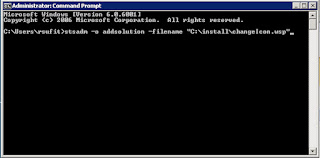
I once had an engineering professor that said ‘It is easy once you know how to do it.’   Obviously, but first you have to know how to do it. This is pretty basic but if you are learning SharePoint administration but I figured I would throw it up here in case someone needed to learn it.   Deploying and retracting a WSP in SharePoint 2007 is makes managing customized SharePoint sites much easier to maintain and manage.   Instead of dropping DLL’s in the GAC or bin, and adding features to the site manually, the WSP or solution package wraps customizations up into a nice portable package. There are three steps to deploying a WSP in a Farm 1.        Add the Solution to the Farm (this is the only step that must be done with the stsadm command line tool, all others can be done via the GUI in central admin) Go to a command prompt and type: stsadm –o addsolution –filename “C:\yourWSPpath\yourWSPname.wsp” 2.        Deploy...

Web Site Monitor Application

Doing work as a developer and system administrator has some advantages.   One being that if I don’t like some of the tools that are available to system administrators, I can write my own.   We have all kinds of monitoring tools in place at my company that email me everything from drive space issues, event logs errors, ping responses and just about everything else except if the application is actually up and displaying expected information.   This means I get 200+ emails a day from systems, fine on workdays, but not so good on weekends.   The solution I came up with was to write a custom console application that reads in the HTML counts the charters.   Based on the number of characters or if an error is returned the code sends an email and a text message to specified accounts.   The reason I count the characters is because an application can throw up an error page like the IIS default page or ‘cannot connect to content database’ SharePoint error without thro...